
Signals, Channels, and Interference: How Wi-Fi Actually Works

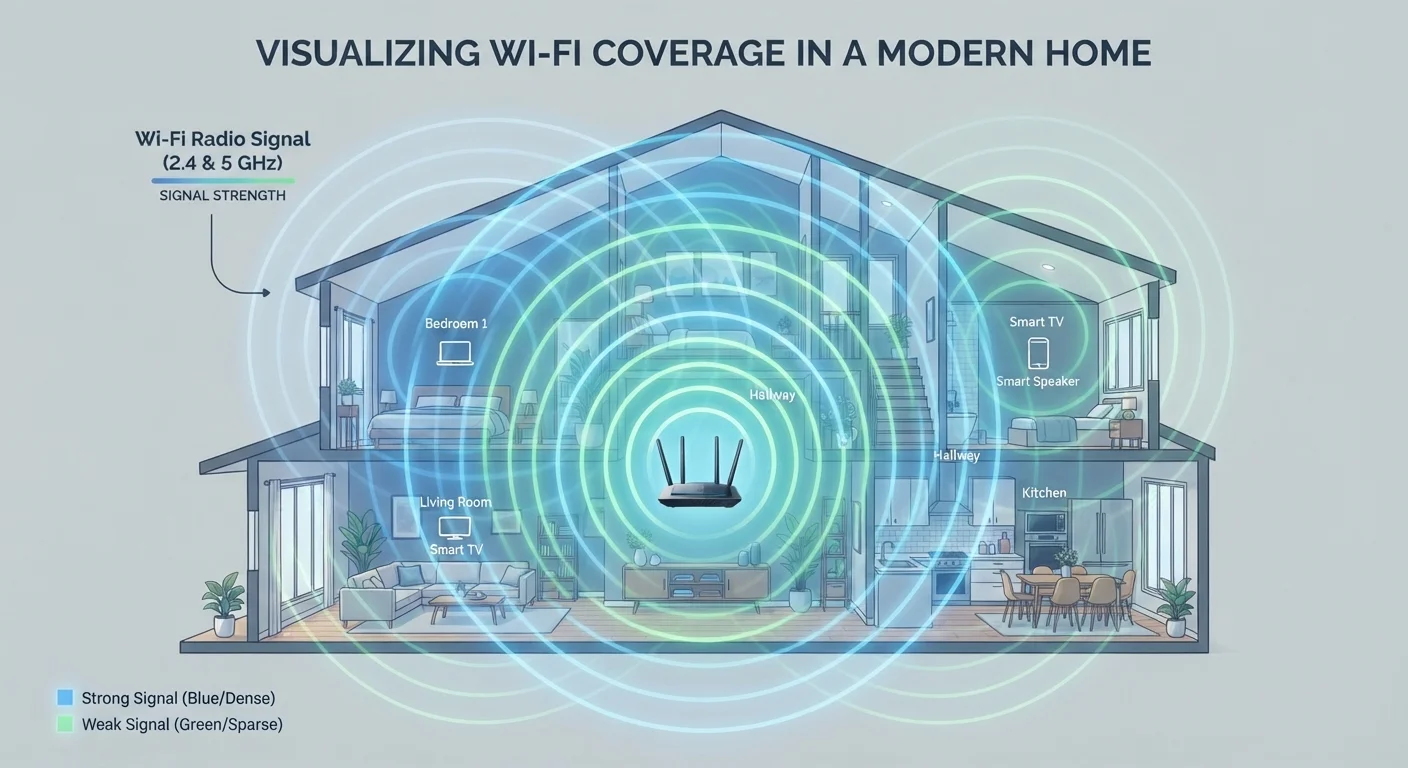
Photo: ShortwebArticles.com | Content For The Curious editorial
Key Takeaways
- Wi-Fi signals are radio waves that weaken with distance and struggle to pass through dense materials like concrete and metal.
- The 2.4 GHz band covers more distance; the 5 GHz band delivers faster speeds over shorter ranges.
- Overlapping channels from neighboring networks are a leading cause of Wi-Fi slowdowns in apartments and dense neighborhoods.
- Manually selecting a less congested channel can meaningfully improve your connection without any equipment changes.
- Router placement — central, elevated, and away from interference sources — has an outsized impact on whole-home coverage.
Radio Waves You Can't See — But Can Learn to Predict
Wi-Fi works by sending data encoded in radio waves between your router and your devices. These waves travel outward in all directions from the router's antenna, much like ripples spreading across water. They pass through open air easily, slow down through wood and drywall, and stop almost entirely at thick concrete or metal surfaces.
This physical behavior explains the "dead zone" behind your refrigerator or in the far corner bedroom — the signal isn't gone, it's been absorbed or reflected to the point where it's too weak to sustain a reliable connection. Distance and obstacles are always working against signal strength, and no software update can change the laws of physics.
Understanding this gives you a useful mental model: your router's signal is not a uniform bubble. It's an uneven shape, warped by every wall, appliance, and piece of furniture it encounters. That means router placement is one of the highest-leverage decisions in your home network setup. See our common home network missteps for placement pitfalls that quietly degrade performance.
Frequency Bands: The 2.4 GHz vs. 5 GHz Trade-Off
Modern routers broadcast on two (or more) frequency bands. Each band has a distinct personality:
- 2.4 GHz: Lower frequency waves travel farther and pass through walls more effectively. The trade-off is slower maximum speed and heavier congestion — this band is also used by Bluetooth devices, baby monitors, and older cordless phones.
- 5 GHz: Higher frequency waves carry significantly more data, translating to faster speeds. But they lose strength faster over distance and struggle more with solid obstacles.
A laptop a few feet from the router will almost always benefit from the 5 GHz band. The same laptop two rooms away may get a more stable connection on 2.4 GHz, even if the raw speed is lower. Most modern routers handle this automatically through a feature called band steering, but knowing the trade-off lets you make informed manual choices when auto-selection isn't working well.
3x
More non-overlapping channels on 5 GHz vs. 2.4 GHz
The 5 GHz band offers significantly more channel separation, reducing the congestion that plagues the crowded 2.4 GHz band in apartment buildings and dense neighborhoods.
~50%
Bandwidth reduction with older range extenders
Traditional single-band range extenders can cut usable throughput roughly in half because they use the same channel to receive and retransmit data simultaneously.
25+
Average connected devices in US households
Research from various industry sources consistently shows that the average American home has more than two dozen internet-connected devices, placing real demands on router capacity and channel management.
Wi-Fi is one of several wireless technologies in your home — it's worth knowing how it differs from short-range alternatives. For a clear breakdown, see how Bluetooth, NFC, and AirDrop compare to Wi-Fi.
Channels and Congestion: The Hidden Cause of Slow Wi-Fi
Within each frequency band, routers communicate on specific channels — narrow slices of the radio spectrum. Think of channels like lanes on a highway. If every router in your apartment building defaults to the same channel, they're all competing for the same lane simultaneously.
In the 2.4 GHz band, the US has 11 channels, but only three — 1, 6, and 11 — are fully non-overlapping. Routers on adjacent channels bleed into each other's transmissions, creating interference even without a direct collision. In dense urban environments, channel congestion is one of the most common and underappreciated causes of slow Wi-Fi.
Find Your Least-Congested Channel for Free
The 5 GHz band has far more non-overlapping channels available, which is one reason it's less congested in addition to being faster. Free apps called Wi-Fi analyzers (available for both Android and iOS) can show you which channels nearby networks are using, so you can log into your router's settings and switch to a quieter one.
This straightforward adjustment costs nothing and requires no new equipment — it's one of the most effective free fixes available to home network troubleshooters. For a fuller picture of what shapes your connection from modem to device, explore everything that shapes your home internet experience.
When More Coverage Is the Goal
If channel optimization and better placement still leave parts of your home with weak signal, extending coverage becomes the next step. Range extenders rebroadcast your existing signal, but they create a separate network node — your devices may not switch to it automatically, and older extender designs cut bandwidth in half due to how they relay data.
Mesh Wi-Fi systems address this by creating a unified network with multiple nodes that hand off connections seamlessly as you move through your home. They generally manage channel selection and band steering more intelligently than a router-plus-extender setup. That said, mesh systems involve their own compromises around cost, configuration, and compatibility. Our balanced look at mesh Wi-Fi trade-offs can help you decide if the switch makes sense for your household.
Whatever approach you take, keep security in mind as you expand your network. A larger network footprint means more potential entry points. Locking down your home Wi-Fi covers the practical steps that keep your expanded network from becoming a vulnerability.
Frequently Asked Questions
The content on this site is for informational purposes only and is not a substitute for professional advice. Always consult a qualified professional for guidance specific to your situation.